BIGONE
Features

What it does, how, and where it stops

Each section follows the same order: what it does, how it works inside, and its limits. Risk levels run from L0 (only reads) to L4 (runs code); the amber ones ask you first.

01

Commands and skills

Every BigOne capability is a skill: a skill.toml manifest, a main.py with exactly one Skill class, and test_skill.py. The manifest holds the skill's name, description, risk level, permissions, the JSON schema of its parameters and the regular expressions for the fast path. The description tells the model when to pick the tool.

  • Sourcesbuilt-in › user › generated; a user or generated skill can never take a built-in command away
  • Permissionsfs.read · fs.write · fs.delete · process.launch · process.kill · network · clipboard · code.exec
  • Disabled skillits code is never imported

LimitSkills you add yourself (user) are trusted code and are not checked. A skill with overly broad or invalid triggers is not loaded.

SkillRiskFast pathWhat it does
list_folderL0yesLists what is in a folder
find_filesL0yesFinds files by name, extension, age
read_fileL0—Reads a code or text file with line numbers
recallL0yesSearches long-term memory
list_grantsL0yesLists folders BigOne may access
list_tasksL0yesLists background tasks
list_watchesL0yesLists reminders and watches
open_folderL1yesOpens a folder in File Explorer
open_urlL1yesOpens a website in the default browser
open_appL1yesStarts an installed app from the Start menu
rememberL1yesSaves a fact or preference to memory
remind_atL1—Reminds you at a given time
notify_when_doneL1—Tells you when a program ends
start_taskL1—Starts a background task it works on alone
cancel_taskL1—Cancels a task
cancel_watchL1—Cancels a reminder or watch
revoke_accessL1yesTakes back a folder grant
create_folderL2yesCreates a folder (reversible)
organize_folderL2yesTidies a folder by type or month (reversible)
edit_fileL2—Replaces an exact snippet in a file (reversible)
write_fileL2—Writes or rewrites a text file (reversible)
undo_lastL2yesUndoes the last reversible file operation
forgetL2yesDeletes memories on a topic; shows what first
draft_skillL2—Drafts a new skill; runs no code
delete_filesL3yesMoves filtered files to the Recycle Bin
delete_folderL3yesMoves a folder to the Recycle Bin
grant_accessL3yesGrants lasting read or write access to a folder
install_skillL4—Installs a pending skill draft (15-min approval)
02

Files and "undo"

Organizing moves files into subfolders by type or by month; it never overwrites an existing file and makes "name (2).ext" instead. A snapshot is taken before editing or writing a file. Every reversible job is recorded; "geri al" (undo) reverts the last one.

  • Deleteto the Recycle Bin only; there is no permanent-delete code
  • Bulk jobsat least one filter, at most 2000 files per run
  • Readingat most 2 MB, no binary files; 12,000 characters per call
  • Neverdrive roots, the home folder, Windows and Program Files; secret files such as .env or SSH keys are never read

LimitFiles over 1 MB are not edited. Known folders (Desktop, Documents, Downloads…) cannot be deleted.

> İndirilenler klasörünü türe göre düzenle   # organize Downloads
  Onay gerekiyor (L2): 43 dosya taşınacak (Belgeler 23, Resimler 14, Arşivler 6).
  … Geri almak için: "geri al".
> geri al                                    # undo
  Onay gerekiyor (L2): Geri alınacak: … 43 dosya eski yerine dönecek.
  Geri alındı: 43 dosya eski yerine taşındı.
03

Long-term memory

What you ask it to remember is written to SQLite and turned into a 768-dimension vector locally, with embeddinggemma in Ollama. Each LLM request gets the 3 records closest in meaning to your message (cosine ≥ 0.45). Without the embedding model, search falls back to word roots and the missing vectors are filled in later.

  • Commands"hatırla" (remember) · "ne biliyorsun" (what do you know) · "bunu unut" (forget this)
  • Turkish testthe right record on top in 4 of 4 queries; correct ones 0.56–0.81, wrong ones ≤ 0.47
  • Retentionlong-term memory is never deleted automatically; chat is kept 90 days

LimitSearch runs over all records in Python; it is built for personal scale.

> hatırla: proje toplantısı her salı 10:00   # remember: …
  fast path · remember · L1
  Tamam, hatırlayacağım: proje toplantısı her salı 10:00
> toplantı hangi gündü?                      # which day was it?
  LLM · the 3 closest memories go into the system prompt
04

Voice

Speech is processed entirely on your PC. The wake word is looked for in the text Whisper produces, not in the audio signal, so no separate wake-word model is needed. The desktop app also has a Talk button: nothing is transcribed unless you press it.

  • Speedsmall on CPU ~3 s per sentence; turbo on NVIDIA also ~3 s, far more accurate; "BigOne, what's on my desktop?" answered in 3.7 s
  • Accuracyturbo on NVIDIA: word error rate 32.7% → 3.8%; wake word 8/8, 0 false alarms
  • Voice approvalup to L2, "evet / hayır" (yes / no); a negation always wins

LimitFast speech can garble Turkish suffixes. Deleting and running code cannot be approved by voice. Turkish only.

Voice pipeline The microphone is read at 16 kHz; an energy-based detector finds where speech starts and ends. Whisper turns the audio into Turkish text and the wake word is looked for in that text. The command goes to the brain and the answer is spoken with Piper. The mic is muted while BigOne speaks. Audio never leaves the PC and is not written to disk. Microphone 16 kHz mono Speech detection +12 dB · 800 ms of silence Whisper small (CPU) · turbo (GPU) Wake word "bigone" in the text ≥ 0.8 Brain Agent.handle · approve ≤ L2 Piper tr_TR-dfki-medium Speaker answer at most 400 chars the mic is muted while BigOne speaks just "BigOne" → "Efendim" (Yes?), listens 6 s AUDIO NEVER LEAVES THE PC · NEVER WRITTEN TO DISK · ONLY TEXT ENTERS THE CHAT
07Voice pipeline. Amber dashed line: the mic is closed while BigOne speaks, so it does not hear itself.
05

Companion

When you say "let's look at this", a work session opens in a folder you granted. The folder is scanned every 2 seconds, changes are batched and the strong model takes one look: mostly it stays quiet, if needed it suggests or warns, and in a write-granted folder it can make a reversible fix. It learns from what you say and how you correct it; background tasks and reminders run here too.

  • Restraintnever speaks before you have been quiet 20 s; at most 3 suggestions per 10 minutes; "be quiet now" lets only urgent warnings through
  • Learninga note starts at 0.4 confidence, +0.15 each time it repeats; passwords, health data and notes that grant permissions are never stored; it is told not to keep notes about other people, and in one eval it still did
  • Tasksstep by step with the usual approvals; asks after 5 steps or 15 minutes; after a restart it never silently resumes

LimitSpeaking up on its own and learning only run with the strong (cloud) model; the local 3B model was weak at this (see the measurements on the AI page).

Mind layer event flow Commands, voice, approval decisions, file changes, task steps and time become events and enter a priority queue. One mind thread answers "Are you there?" without a model, hands work to the hand (the Agent) and has the strong model look at file changes. Replies and notices go out through the NoticeBoard to the WebSocket and the voice reader. Command · CLI · API · phone Voice Approval decision File change Task step Clock · process ended EventQueue USER › URGENT › NORMAL › LOW kept in the event table Mind one thread "Are you there?" no model + pending notices Hand Agent · 2 workers Attention strong model: ignore · say · fix NoticeBoard urgent · normal · low WS /v1/events desktop · phone · voice
08The mind layer. Amber: the attention part that looks at file changes.
06

Self-extension

When you ask for something no skill can do, BigOne offers to write a new skill. The model writes the manifest, code and test; a static check inspects allowed imports, forbidden constructs and risk consistency without running anything. To install it you see the full code of all three files on screen and approve; only then do the tests run, in a separate sandbox process.

  • Sandboxtemp copy, clean environment, Windows Job object: one process, 1 GiB memory, 60 s
  • Versionsan installed skill is committed to git; rollback or removal is one command
  • Corenever changed; only new skill folders are added

LimitIn-process isolation can be bypassed; the real boundary is you reading and approving the code. OS-level isolation (AppContainer) is deferred.

Self-extension: a new skill When the user asks for a new capability, BigOne prepares a draft: the model writes the manifest, the code and the test, and a static check inspects them without running anything. The draft waits untested. If the user reads the code on screen and approves, the tests run in a separate sandbox process; if they pass the skill is installed and committed to git, if not it is not installed. Request "write a skill for this" draft_skill · L2 the request goes to a model The model writes skill.toml · main.py · test Static check runs no code · ≤ 3 tries Draft skills\_pending not tested yet install_skill · L4 on screen only · 15 min pinned to the files' SHA-256 Sandbox test Job object · 1 GiB · 60 s no network · no child process Passed skills\generated git commit · hot reload Failed not installed a fix draft is offered APPROVE FIRST, RUN SECOND: NO PART OF MODEL-WRITTEN CODE RUNS BEFORE APPROVAL
09The path of a new skill. Amber: the step where you see and approve the code.
07

Phone

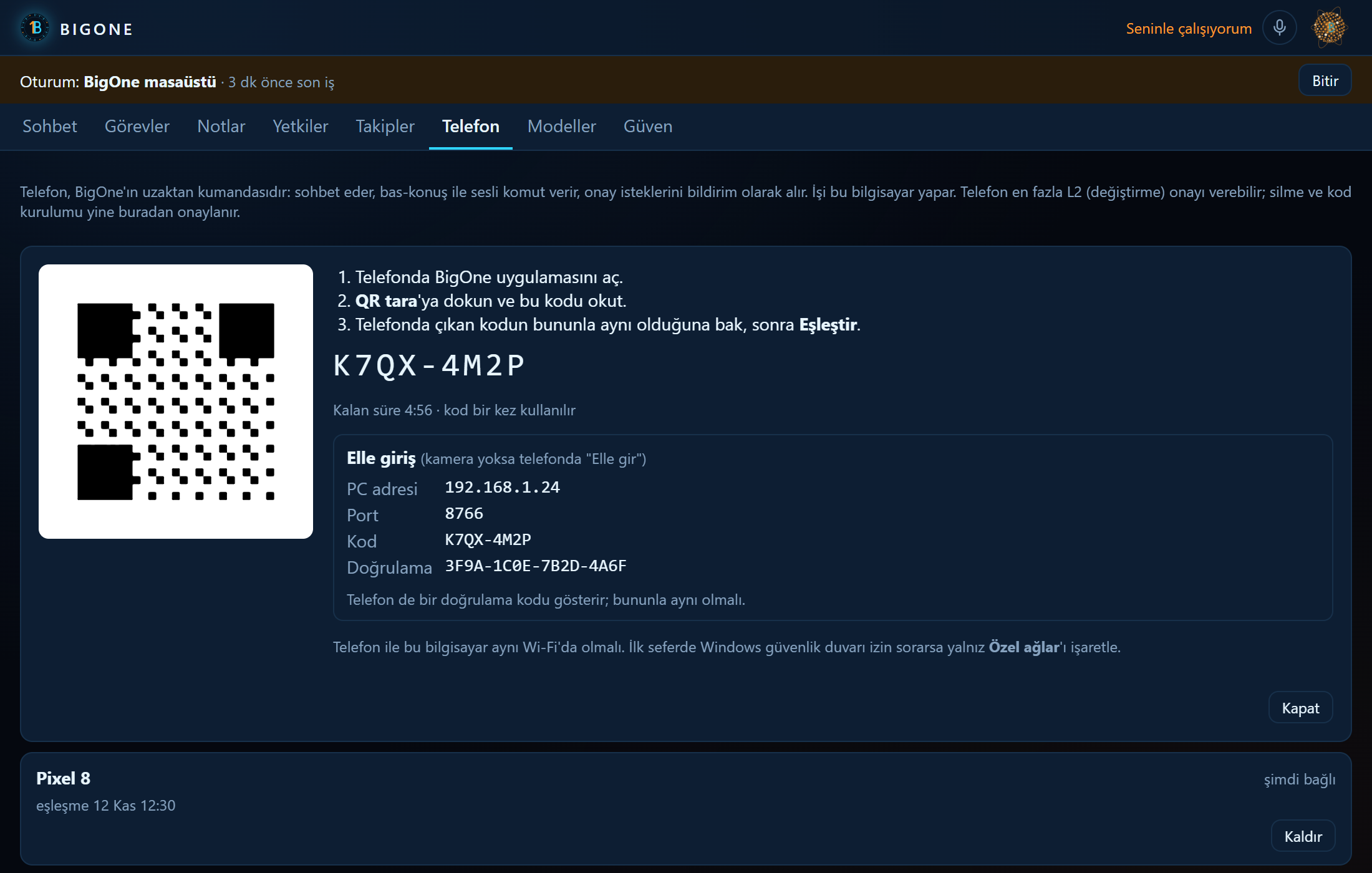
The Android app is a remote control for BigOne on your PC: text chat, push-to-talk and approval notifications. Audio is recorded on the phone and transcribed on the PC with Whisper. Pairing works with a QR code or, without a camera, by typing it in; both screens show the same 16-character verification code.

  • Phone tokenchat, voice commands, approvals, event stream; cannot change keys, permissions, devices or voice settings
  • Approvalup to L2; deleting and installing code only on the PC screen
  • TechKotlin, Jetpack Compose, OkHttp, ZXing (no Google Play Services), Android Keystore

LimitSame Wi-Fi or VPN only; no port forwarding. No fallback intelligence on the phone: if the PC is off, the app says so. Android 8.0 or newer.

Phone tab: QR code, 8-character pairing code, PC address, port 8766 and the verification code
10"Add phone" on the desktop: the QR, the details for typing it in, and the paired phones.
08

Desktop app

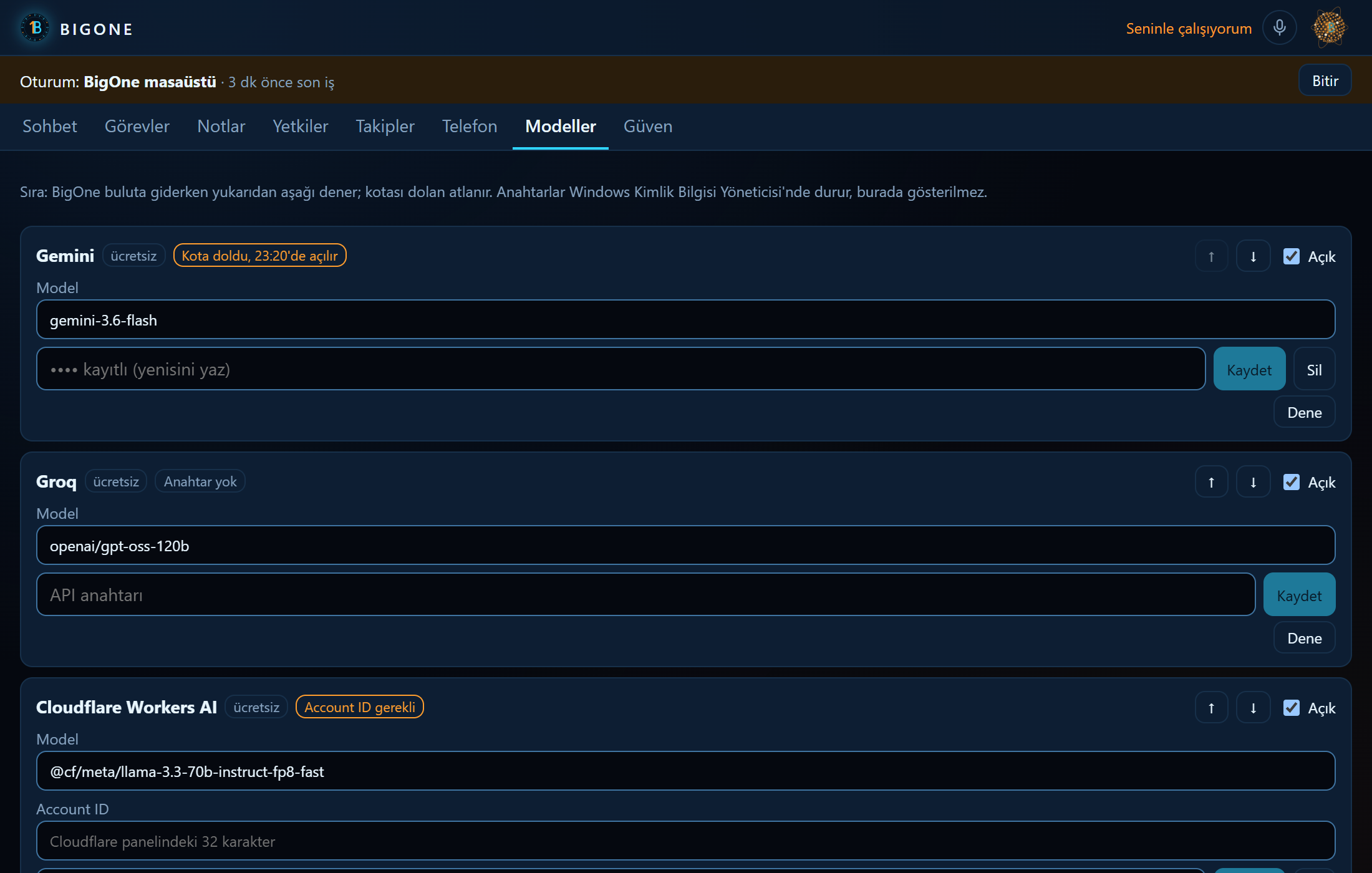
A Tauri app that lives in the system tray. If the core is not running it starts it without a window, and it only stops a core it started itself. Tabs: Chat, Tasks, Notes, Grants, Watches, Phone, Models, Trust. The approval window always opens on top; if the window is hidden you get a Windows notification.

  • Tray ringblue: here · amber: working with you · grey: away or unreachable
  • Modelsturn providers on/off, model, key (write-only), order, "Test"; no restart needed
  • Bridgethe Rust bridge only allows /v1/ paths; the token never reaches the web UI

LimitThe installer is unsigned: SmartScreen warns about an unknown publisher. No in-app updates; a new installer goes over the old one and keeps your data.

Models tab: Gemini with a quota-exhausted badge, Groq without a key, Cloudflare needing an Account ID
11The Models tab: free providers, when Gemini's exhausted quota reopens, Groq without a key.